AI-built website vs WordPress: pros, cons, and which one wins for SEO
An AI coding agent handles heading structure, open graph, metadata, and security automatically. WordPress leaves all of that to you. Here's an honest look at both approaches — and where each one actually wins.
Two philosophies
WordPress was built on the idea that anyone should be able to manage their own website without writing code. It gives you a content management system — a UI for creating pages, writing posts, uploading media — and a nearly infinite library of themes and plugins that extend its functionality. The power is real; so is the responsibility.
AI-built websites start from a different assumption: that the technical decisions should be handled by the system, not the user. An AI coding agent generates the site code from your requirements, making the right choices about structure, performance, and SEO without requiring you to know what those choices are.
Both approaches can produce a live, functional website. The differences lie in what happens before launch, who is responsible for quality, and what the result looks like under the hood.
What an AI coding agent handles for you
When an AI agent builds your website, it applies a set of best practices that most WordPress users never configure correctly — because most WordPress users don't know they exist:
- Heading hierarchy (H1–H6): Search engines use your heading structure to understand the organisation and relative importance of content on each page. A correct hierarchy — one H1 per page, logical H2–H6 nesting — is a fundamental SEO requirement. WordPress leaves this entirely to the content creator, who typically doesn't follow the rules consistently.
- Meta titles and descriptions: Every page should have a unique, keyword-relevant meta title and a well-written description. On WordPress, this requires an SEO plugin (Yoast, RankMath) and manual attention for every page. An AI agent sets these correctly from generation.
- Open Graph and social metadata: Open Graph tags control how your pages appear when shared on social media — the title, description, and image that appear in the preview card. These are easy to get wrong and rarely configured correctly on WordPress without deliberate effort.
- Semantic HTML: Proper use of HTML elements (article, nav, header, footer, main, aside) helps search engines and screen readers understand page structure. An AI agent produces semantic HTML by default; WordPress themes vary wildly in quality.
- Performance: Image optimisation, correct resource loading order, and avoiding render-blocking scripts are applied at generation. On WordPress, these typically require additional plugins and configuration.
- Schema markup: Structured data (JSON-LD) tells search engines specific facts about your business — your address, phone number, opening hours, type of business. AI-generated sites include this correctly; WordPress requires a separate plugin and manual configuration.
SEO: where each wins
AI-built site — Pros
- Correct heading structure from day one
- Meta tags, Open Graph, schema markup applied correctly
- Clean, semantic HTML that search engines parse easily
- No plugin conflicts that break SEO behaviour
- Performance optimised at generation
AI-built site — Cons
- Adding blog content requires prompting or a CMS layer
- Less flexible for niche SEO tactics without regenerating code
- SEO updates require code changes, not a dashboard
WordPress — Pros
- Powerful SEO plugins (Yoast, RankMath) once configured
- Easy to create and optimise blog content in the editor
- Full control over every technical SEO setting
- Large community of SEO-focused resources and guides
WordPress — Cons
- Heading structure depends entirely on the theme and user discipline
- Meta tags, schema, and Open Graph require plugins and manual input
- Poorly configured WordPress is worse for SEO than a simple static site
- Plugin conflicts can silently break SEO configurations
The summary: a well-configured WordPress site, managed by someone with SEO knowledge, can be excellent. But most WordPress sites are not well configured. An AI-built site is correct by default, without requiring expertise to achieve it.
Performance: the numbers
WordPress sites carry inherent performance overhead: PHP rendering on every request, a database query chain to assemble each page, and the cumulative weight of plugins adding scripts and stylesheets whether you need them or not. Even a well-optimised WordPress installation is fighting against its own architecture.
AI-built sites are generated as static files — no PHP, no database, no plugin layer. The server sends pre-rendered HTML directly to the browser. The difference is measurable in Lighthouse scores. Here is the same business, Coachlife, on two different stacks:
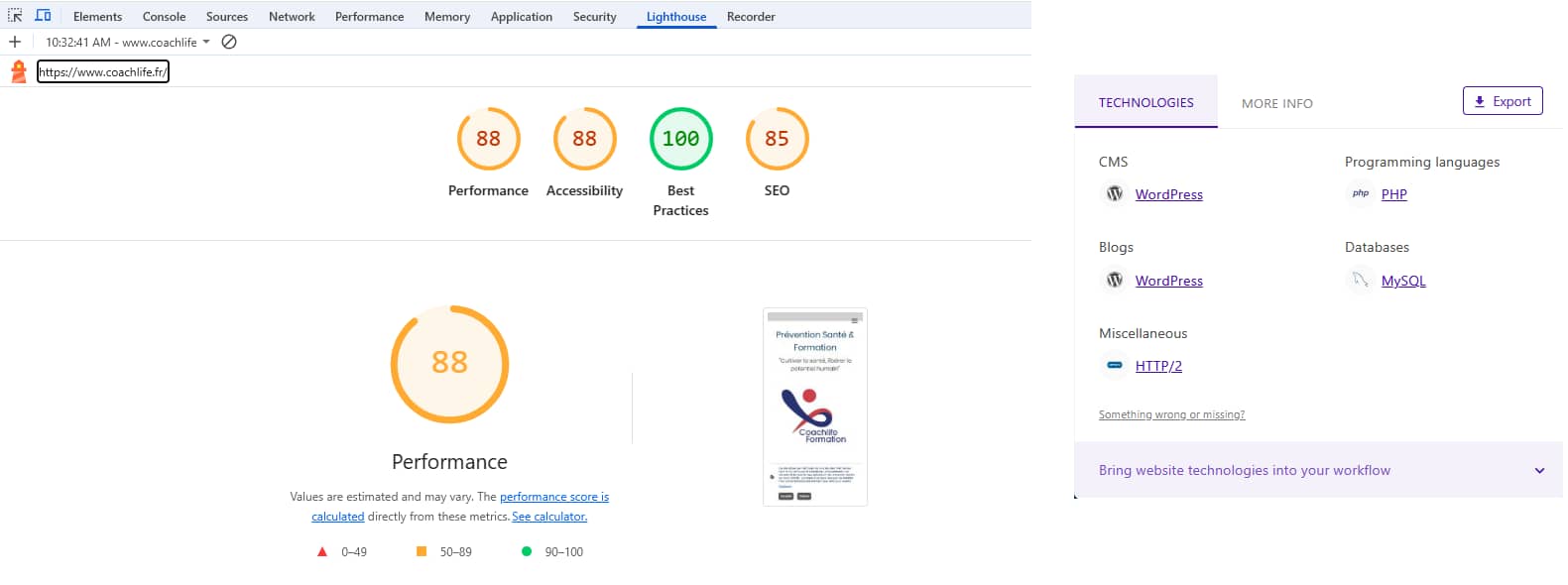
Site WordPress
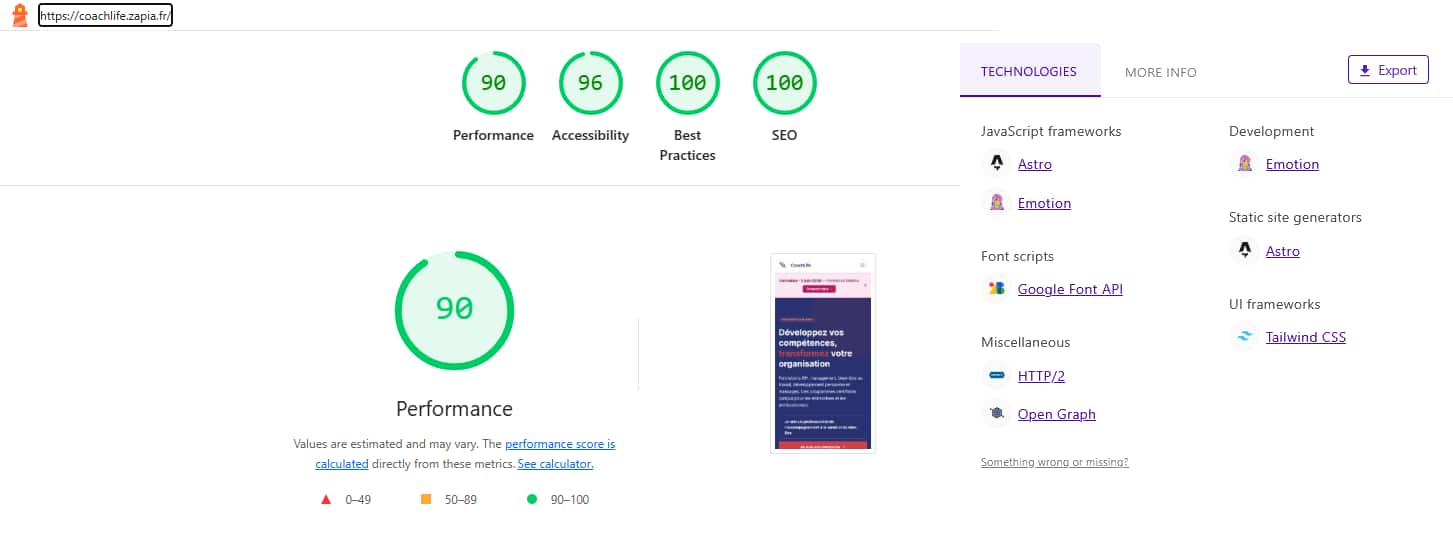
Site IA
The AI-built version scores higher on every metric — including a perfect 100 on SEO — without any manual configuration. The WordPress version, despite being a real, actively maintained site, scores 85 on SEO and sits in the orange range on performance.
Security comparison
Security is where the gap between AI-built sites and WordPress is widest.
- AI-built sites have no plugin ecosystem — which means no third-party code running on your server, no plugin vulnerabilities to patch, no abandoned plugins accumulating risk. The attack surface is limited to the core site code and the hosting infrastructure.
- WordPress sites are the most compromised websites on the internet — not because WordPress core is insecure, but because the average WordPress installation has 10–20 plugins, many of which are under-maintained. The more plugins, the more potential entry points.
- Updates: AI-built sites hosted on managed infrastructure don't have plugins to update — security updates are handled at the infrastructure level. WordPress requires regular updates to core, theme, and every plugin, which many site owners neglect.
Flexibility and day-to-day control
This is where WordPress genuinely wins — for users who invest the time.
Once a WordPress site is well set up, making content changes is accessible to non-technical users: writing a new blog post, changing a banner image, updating a phone number. The Gutenberg editor and most page builders provide a visual interface that requires no coding knowledge.
With an AI-built site, making changes typically means prompting the AI to regenerate or update specific sections. For text and content updates, this is fast. For more visual or structural changes, it requires a different workflow than clicking in a visual editor. This is a real limitation — honest to acknowledge.
- WordPress wins: Non-technical team members updating content regularly; news sites; blogs with heavy editorial workflows; e-commerce with complex product management
- AI wins: Business sites where the main content is stable; landing pages; professional portfolios; any case where getting the technical foundations right matters more than ease of daily editing
Speed to launch
AI-built sites are significantly faster to launch. From requirements to a live, optimised site can be measured in hours — not weeks. There's no theme to select and configure, no plugins to research and install, no development environment to set up.
A properly configured WordPress site — with the right theme, necessary plugins, correct SEO setup, security configuration, performance optimisation, and tested for mobile — typically takes a developer several days, and a non-technical user several weeks of learning and trial-and-error.
Verdict
AI-built websites win on SEO foundations, security, and speed to launch. They get the technical details right by default — heading structure, metadata, open graph, schema, performance — without requiring the user to know those details exist.
WordPress wins on flexibility and editorial workflow once it's correctly set up. If you have a technical team, an SEO specialist, and a disciplined approach to plugin management and updates, WordPress can be excellent.
For most small businesses — especially those launching without a dedicated technical team — the trade-off is clear: AI is quicker, safer, and better for SEO out of the box. WordPress is powerful, but the effort required to realise that power is significant, ongoing, and often underestimated.